.png?width=161&height=72&name=Logo%20light%20tr%20(1).png)
Depending on the available driver information and your Track Preferences, the unit card can show the driver associated with the unit and their profile image.
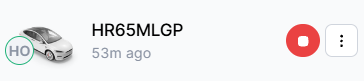
Driver information on the unit card can include:
- Driver: The driver associated with the unit, when driver information is available.
- Driver image: The driver's profile image, when one is available and configured.
This makes it easier to identify the driver associated with a unit without opening the secondary panel.
Driver information may not appear on every unit card.
It is shown when:
- Driver information is available for the unit.
- Your Track Preferences are configured to display driver information.
- The required driver information has been received or configured for the unit.
If driver information is not available, the unit card may not display a driver.
Tip: If you expect to see driver information but it is not displayed, check your Track Preferences and confirm that driver information is available for the unit.