.png?width=161&height=72&name=Logo%20light%20tr%20(1).png)
Only active I/O signals are shown on the main Unit Card. More detailed I/O information is available from the unit's Telematics view.
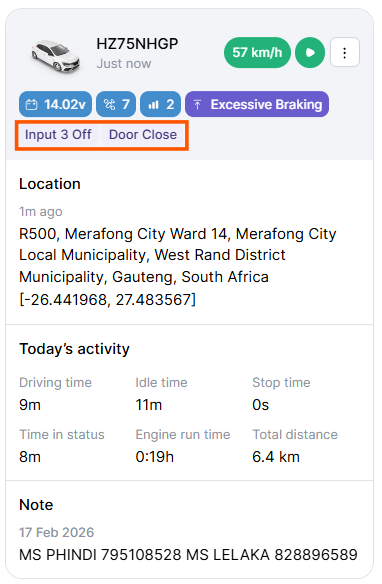
When Input/Output Status is enabled:
- Active signals are displayed: Inputs and outputs that are currently active or triggered appear on the Unit Card.
- Active signals are highlighted: Status icons make active I/O signals easier to identify at a glance.
- Inactive signals are hidden: Inactive or disconnected signals are not displayed on the main Unit Card, helping keep the card easy to scan.
Tip: Enable Prioritize Active Inputs if you regularly monitor I/O activity. Units requiring attention will be easier to find without manually searching through the unit list.