.png?width=161&height=72&name=Logo%20light%20tr%20(1).png)
Language & Region settings allow you to choose how language, dates, times, and measurement units are displayed.
These are personal settings. Your selections change how information is shown to you and do not change the underlying data or the settings of other users.
To access these settings, go to Settings > Language & Region.
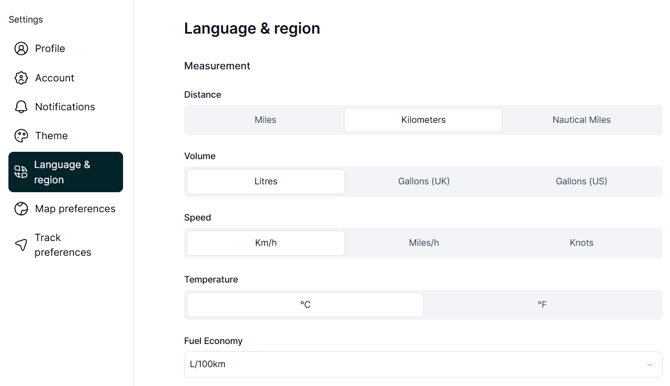
Measurements and Units of Measure
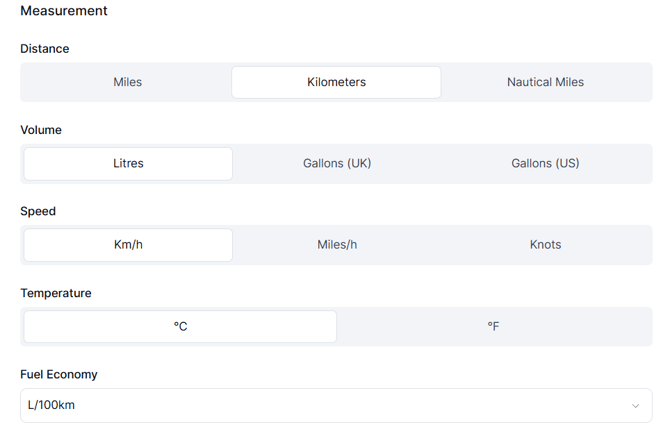
You can choose which measurement units are used when information is displayed.
|
Measurement |
Available options |
|---|---|
|
Distance |
Kilometers, Miles, Nautical Miles |
|
Speed |
Km/h, Miles/h (mph), Knots |
|
Temperature |
Celsius (°C), Fahrenheit (°F) |
|
Volume |
Litres, Gallons (UK), Gallons (US) |
|
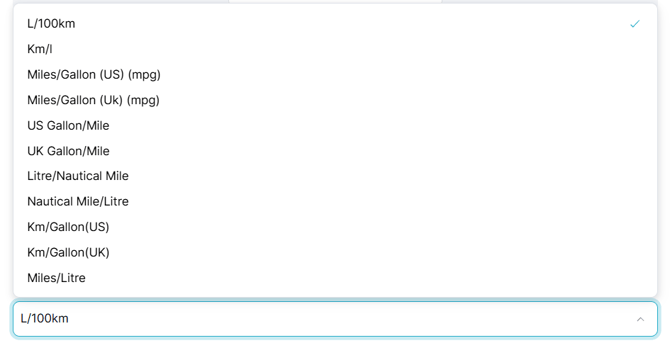
Fuel Economy |
L/100km, Km/L, MPG (US), MPG (UK), Gallon-per-mile formats, Nautical-distance-based formats |
Localisation
The Localisation settings control how language, dates, and times are displayed.
Language
Select your preferred language from the available language options. The languages available to you may depend on the languages supported by the platform.
Time Zone
Select your local time zone to ensure that dates and times are displayed correctly for your region. Choose the format that is most familiar to you or commonly used in your region.
.png?width=670&height=275&name=image-20260909-083326%20(1).png)
Tip: Set your Time Zone, Date and Time Format, and Units of Measure to match your region. This makes information such as trip times, distances, speeds, and fuel values easier to read and understand.