.png?width=161&height=72&name=Logo%20light%20tr%20(1).png)
Use this section to quickly check when the trip started, how long it lasted, the distance traveled, and its status.
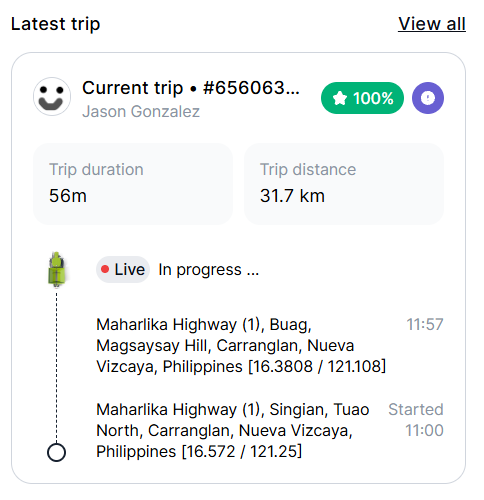
Information displayed
The information shown depends on the data available for the selected unit:
- Driver Icon and Name: Display the name and icon of the driver, when there is a driver.
- Trip ID: Unique identifier for the trip.
- Trip Score/Driver Score: A Trip score measures performance for a specific trip, while a Driver score applies the same scoring principles across all relevant trips for that driver.
- Input/Output Activations Count:
- Trip Duration: The elapsed time of the trip.
- Trip Distance: The distance recorded for the trip.
- Trip Status: The status of the trip, such as in progress or completed.
- Start Location and Time: The location, date and time the trip began.
- End Lotion and Time: The location, date and time the trip finished or last location.
- View All: Select View all to open the Trips tab in the Secondary Panel, where you can review the unit’s trip history in more detail.
Tip: When reviewing a trip that is still in progress, the end time may not yet be available. Check the trip status to help you understand the information shown.